
An attacker moving through your network typically goes unnoticed for weeks – and is often only caught because they make a mistake. Canary tokens turn this around: you place harmless-looking bait, and as soon as someone touches it, you get an instant alert by email or webhook.
The idea comes from the canary in the coal mine: it raises the alarm before humans notice anything. For small and medium-sized businesses, this is one of the most affordable early-warning measures there is – the basic version is free and set up in minutes.
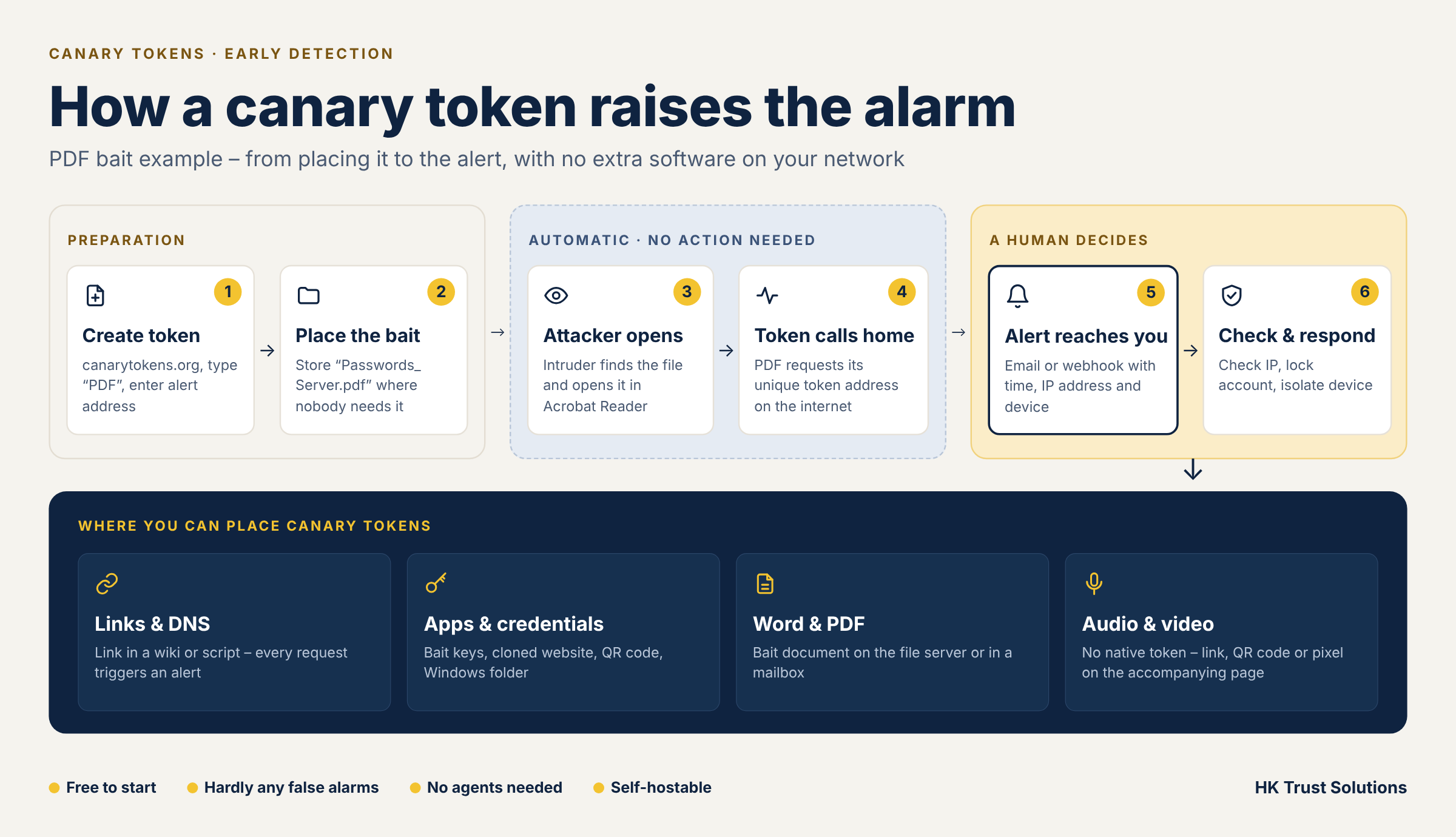
What are canary tokens?
A canary token (also called a honeytoken) is a file, link or set of credentials that serves no real purpose – except one: it reports back as soon as someone interacts with it. They are developed and operated free of charge by Thinkst (canarytokens.org); the code is open source and can also be self-hosted.
The principle is the same for all variants:
- You create a token and specify an email address or webhook (e.g. Teams, Slack) for the alert.
- The token contains a unique, unguessable address – a URL or a DNS name.
- When the token is opened or used, this address is requested.
- The canary server registers the request and sends you a notification with the time, source IP and – depending on the type – user agent.
Important: each token belongs in exactly one place. That way, when an alert comes in, you immediately know where something happened.
Provider example: Thinkst. The South African company Thinkst offers a free hosted service at canarytokens.org that works without an account. Thinkst also sells a commercial product, “Thinkst Canary” (hardware and virtual appliances plus managed tokens with a central console), which suits larger environments.
Self-hosting: Since Canarytokens is published as open source (Thinkst’s GitHub project), you can also run the service on your own infrastructure. This makes sense if alert data should stay in-house or attackers must not recognise the known patterns of the public instance.
- Technology: The application runs as Docker containers (Docker Compose) with a database backend on a small Linux server or VM.
- Requirements: your own domain pointing to the server via DNS, a publicly reachable IP address, and mail delivery (SMTP) or a webhook for the alerts.
- Security: The server itself must be hardened and kept up to date – a vulnerable token server would be a risk rather than protection. Ideally run it in a separate network zone.
- Effort: Expect some setup and ongoing maintenance effort; in return there is no dependency on the external service. Detailed instructions are in the project documentation.
Why do you need them?
Canary tokens detect incidents that classic defences such as firewalls and antivirus don’t report – because the attacker is already inside the network and only uses legitimate tools. Typical scenarios:
- Compromised mailbox or account: A bait document in the mailbox or on the file server reveals when someone is snooping around.
- Data exfiltration: A document opened somewhere after being stolen reports its new location.
- Cloud credentials in a repository or on a server: Fake access keys trigger an alert as soon as someone tries them.
- Phishing copies of your website: A token in the source code reports when your site is cloned on someone else’s server.
- Insider risk: A temptingly named document (e.g. “Salary list”) shows who is interested in it.
The big advantage: there are hardly any false alarms. A genuine employee has no reason to open the file “Admin-Passwords_old.docx” – so every alert deserves attention.
Canary links: the simplest token
The web bug or canary link is a link that triggers a notification as soon as it is called. It is the basis of almost all other variants.
How it works: You get a URL with a unique identifier. Every request – by click, script or automatic link scanner – is logged. Optionally, a small JavaScript snippet captures extra details such as browser and operating system. A link request always provides IP address, timestamp and user agent.
Typical placements:
- As a link on a wiki page (e.g. Confluence) that nobody actually needs: “Admin accounts”, “VPN backup”
- In a text file or note on a server
- In an email to a mailbox that only serves as a trap
- As a reference in source code or configuration files
“DNS token” variant: Instead of a URL, the token generates a hostname. Merely resolving the name triggers the alert – handy for configuration files, scripts and database entries where nobody opens a browser.
Keep in mind: Email gateways and security solutions often fetch links automatically to check them. This can trigger an alert without any human access. Prefer placing link tokens where no automatic scanning takes place, and assess the user agent and IP address of every alert critically.
Canary tokens in apps and credentials
Besides links, there are tokens that hide in applications and cloud environments. Here is a selection of the most relevant ones for SMBs:
| Token | What it is | When the alert fires |
|---|---|---|
| AWS access key | Fake access key including secret | As soon as someone uses the key against AWS |
| Cloned website | Token in your website’s source code | When your site is loaded on a foreign domain (e.g. a phishing copy) |
| QR code | QR code containing the token URL | As soon as the code is scanned |
| Windows folder | Folder with token configuration | When the folder is opened in Windows Explorer |
| Sensitive command | Token that fires when a specific program (e.g. whoami) is run | As soon as an attacker uses typical reconnaissance commands |
| Database dump (MySQL) | Bait SQL file | When the dump is imported |
| Kubeconfig / WireGuard | Fake configuration files | When someone uses the configuration |
| Custom image | Image with tracking pixel | When the image is loaded |
Real-world example: A developer accidentally commits cloud keys to a Git repository. An attacker who copies the repository tries the key – and you know the same day that someone has access to your code. The fake keys themselves have no permissions at all.
Word and PDF documents as bait
Document tokens are the most tangible variant: a perfectly normal file that secretly contacts the canary server when opened.
Word (.docx, also Excel): The file contains an embedded reference to an external resource. When someone opens the document in Word, this resource is loaded – and the request triggers the alert. No macros need to be enabled. There is also a macro variant (.docm), but it causes more warnings and is rarely the better choice.
PDF: The PDF contains an action that sends a request when opened in Adobe Acrobat Reader. With many other PDF viewers, such as browser viewers, this does not work reliably.
Using your own documents: You can upload an existing file so the bait looks inconspicuous. The file name is key: it should spark curiosity without being something your staff need in daily work.
Good file names and locations:
Passwords_Server_2024.docxin the admin area of the file serverSalary_List_Management.pdfin an administration folderBackup-Credentials.docxin the mailbox of a rarely used account
Limitations: The alert only fires if the device is online when the file is opened and the application is allowed to load external content. If Word’s Protected View is active, the resource is often only loaded after “Enable Editing”. An attacker who only views the file offline or opens it in an isolated environment triggers nothing. Cloud storage with automatic previews and virus scanning can also cause false alarms – so prefer local file servers.
Audio and video: what works – and what doesn’t
To be clear: there is no classic “audio canary token” where an MP3 file raises the alarm when played. Audio and video files cannot connect to the internet on their own; players don’t execute embedded content the way Word or Acrobat do.
Still, recordings can be monitored – via the way they are published or shared:
- Token link in the description: For podcasts, video conference recordings or training videos on the internal portal, place an accompanying note with a canary link next to the file (“Transcript”, “Attachments to the recording”).
- Tracking pixel on the playback page: If the recording is offered on your own web or intranet page, an embedded token image reports every page view.
- QR code in the video or slides: A QR code in the picture becomes an alarm when scanned – useful when confidential recordings are copied and shown elsewhere.
- Watermarking: To trace the source, an individual audible or inaudible watermark per recipient helps. This is a different method from canary tokens, however, and requires special software.
For most SMB scenarios, documents, links and credentials are far more effective than the detour via audio.
Limitations, data protection and best practices
Canary tokens are an early-warning system, not a shield. They do not replace endpoint protection, backups or patch management.
Limitations
- Experienced attackers can recognise and avoid tokens, especially with the public Thinkst instance and its known patterns. For high requirements, self-hosting is recommended.
- The alert only arrives if the device is online and the request is not blocked.
- Without a defined response process, an alert is worthless.
Data protection
- An alert contains the IP address and device information of whoever triggered it. This also applies to your own employees.
- Use tokens to detect attacks, not to monitor employees. Check whether the works council needs to be involved and document the processing in your record of processing activities.
- This article does not replace legal advice.
Best practices
- Exactly one token per location, with a meaningful note (e.g. “File server \\FS01\Administration\SalaryList”).
- Send alerts to a monitored mailbox or channel – not to a single person who might be on holiday.
- Define in advance what happens when an alert fires: check the IP, lock the account, isolate the device.
- Place tokens near “attractive” targets: admin shares, backups, development environments.
- Only insiders (IT, management) know the locations; nobody else does.
- Test tokens regularly and re-place them after changes to your environment.
Conclusion
Canary tokens are inexpensive, quick to set up and deliver exactly what many companies lack: a signal that something is wrong before the damage is done. Document tokens (Word, PDF), credential bait and canary links in places nobody needs in daily work are especially effective.
At HK Trust Solutions, we help you place tokens sensibly, set up alert channels and define response processes – tailored to your IT environment. Get in touch: +49 7721 402 414 0 or via hk-ts.de.